

CanadaGPS.ca
Columbus P-70 Ultra Precise GNSS Receiver (TTL / UART and Bluetooth Interfaces, 1 cm accuracy with RTK, 30 cm accuracy standalone)
Columbus P-70 Ultra Precise GNSS Receiver (TTL / UART and Bluetooth Interfaces, 1 cm accuracy with RTK, 30 cm accuracy standalone)
Country of Origin: China
Couldn't load pickup availability

The Columbus P-70 Ultra UART / TTL Version is Columbus’ 2025 flagship GNSS receiver for professionals who need dependable, high-precision positioning—and a direct 3.3 V UART/TTL interface for embedded integration. In RTK mode it delivers 1.0 cm horizontal and 1.5 cm vertical accuracy, with 30 cm accuracy in standalone SBAS mode—suitable for surveying, mapping, RTK infrastructure, robotics, UAVs, and custom hardware builds.
This SKU is built around UART/TTL connectivity for MCUs, single-board computers, and OEM systems: the wired connection cable ends in a UART 3.3 V TTL interface, not a USB plug. Bluetooth 5.1 remains available for wireless workflows, including iOS via GeoAstra BLE-GNSS. A high-gain waterproof dual-band antenna (L1 and L5) supports strong outdoor reception in a compact, low-power package.
UART / TTL Version · 3.3 V TTL · 1.0 cm RTK horizontal · Dual-band L1/L5 · Bluetooth 5.1 · Rover & base modes · 65 × 18 × 10 mm · 27 g
Key Features

Centimeter-Level Accuracy
- RTK: 1.0 cm horizontal · 1.5 cm vertical
- Standalone / SBAS: 30 cm (CEP 50%)
- Built for precision surveying, mapping, and professional applications
→ Survey-grade precision in a pocket-sized receiver

Dual-Frequency GNSS
- Supports L1 and L5 bands
- Improved reception and faster positioning
- Better performance in challenging environments
→ Stronger dual-band signals than single-frequency receivers

High-Gain External Antenna
- LNA gain: +29±2 dB (L1) · +27±2 dB (L5)
- IP67 waterproof antenna for outdoor use
- Active amplification · SMA connector · 300 cm cable
→ Outdoor-ready antenna with strong dual-band gain

Flexible Antenna Design
- Default magnetic high-gain antenna for vehicles
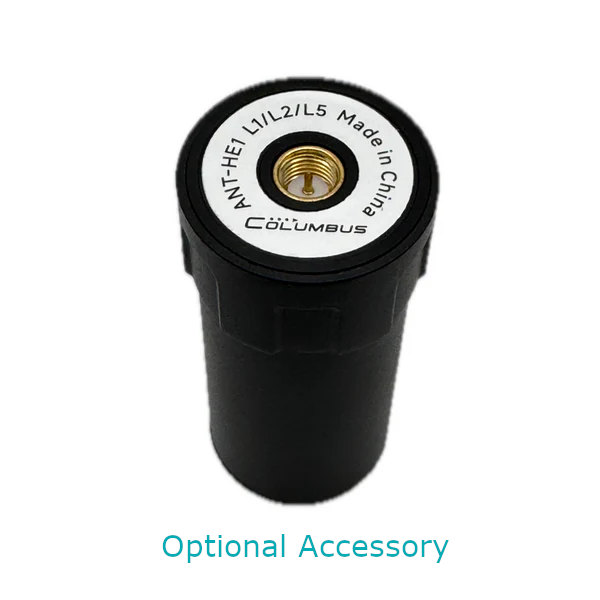
- Supports optional helical antennas for UAVs and specialty mounts
- Magnetic / adhesive mounting options
→ One receiver platform for vehicles, UAVs, and custom setups

Compact · Lightweight · Low Power
- 65 × 18 × 10 mm
- Weight: 27 g (UART / TTL version)
- Power: DC 3.3–5 V / 80 mA
→ Sized for portable systems and embedded installs

UART / TTL First · Bluetooth When Needed
- Primary wired interface: cable ends in UART 3.3 V TTL (not USB)
- Direct MCU / embedded wiring without a USB host
- Bluetooth 5.1 dual-mode (SPP / BLE) when you need a wireless client
→ Wired TTL for OEM builds, or Bluetooth for phones and field apps

RTK Rover & Base Modes
- Rover mode with CORS / NTRIP correction networks
- Base mode with NTRIP software for RTCM streaming
- RTCM MSM4 / MSM7 support
→ One device for field rover work and local base streaming

Fast Init · Multi-Constellation
- GPS · BeiDou · GLONASS · Galileo · QZSS · IRNSS
- Dual-frequency reduces multipath and speeds acquisition
- RTK initialization typically under 5 seconds
→ Global constellation coverage with quick RTK lock

Cost-Effective Professional Solution
- Professional-grade precision and feature set
- Accessible pricing for individuals and enterprises
- Strong value for surveying, mapping, and RTK projects
→ Flagship capability without a flagship-only budget
Test and Demo
Independent static and dynamic tests under clear-sky conditions with an approximate 500 m baseline (RTK tests).
1. RTK Mode — Static Positioning Test
- Objective: Evaluate static positioning accuracy
- Duration: 1 hour · Refresh rate: 1 Hz
- Time: UTC 2024-12-31 14:24:01 to 15:24:00
- Method: Antenna kept stationary while collecting 3,600 consecutive points; average position used as center; CEP calculated
- Conditions: Clear skies · ~500 m baseline · continuous RTK corrections
- Download raw data recorded by P-70 Ultra


Results
- CEP(50%): 0.3034 cm — better than the specified 1.0 cm
- CEP(100%): 1.0618 cm
→ 50% of points fell within a 0.3034 cm radius of the average position
2. RTK Mode — Dynamic Stability Test
- Objective: Assess positioning and tracking accuracy during motion
- Duration: 785 seconds · Refresh rate: 1 Hz · Rotations: 20 cycles
- Time: UTC 2025-01-03 14:05:55 to 14:18:59
- Method: Antenna phase center on a 20 cm-radius disc edge; ~40 s/cycle (~3.1 cm/s linear speed)
- Conditions: Clear skies · ~500 m baseline · continuous RTK corrections
- Download raw data recorded by P-70 Ultra

Synchronized visual record from the disc rotation test.

Results
Tracking ultra-slow motion is demanding for RTK devices. In this test:
- Recorded trajectory matched a ~19.5 cm radius path (from the antenna phase center)
- Across multiple rotations, trajectory width stayed within 1 cm
→ Exceptional tracking consistency under slow, repeated circular motion
3. SBAS Mode — Independent Static Positioning Test
- Objective: Evaluate standalone accuracy without RTK corrections
- Duration: 1 hour · Refresh rate: 1 Hz
- Time: UTC 2024-12-30 12:40:00 to 13:39:59
- Method: Antenna kept stationary; 3,600 points; CEP from average center
- Conditions: Clear skies · DGPS / SBAS throughout
- Download raw trajectory data recorded by P-70 Ultra


Results
- CEP(50%): 21.7055 cm — better than the specified 30 cm
→ Strong standalone accuracy when RTK corrections are unavailable
Technical Specifications
Protection & Environment
| External GNSS Antenna | IP67 |
| Receiver Body | Not waterproof |
| Operating Temperature | -40°C to 85°C |
GNSS Chipset
| Chipset | High-precision RTK GNSS chipset with EPS Ultra Technology |
| Channels | 120 |
GNSS Bands — L1
| GPS | L1C/A · 1575.42 MHz |
| BeiDou | B1I, B1C · 1561.098 MHz |
| Galileo | E1B/C · 1575.42 MHz |
| GLONASS | L10F · 1602 MHz |
| QZSS | L1C/A · 1575.42 MHz |
| SBAS | L1C/A |
GNSS Bands — L5
| GPS | L5 · 1176.45 MHz |
| BeiDou | B2a · 1176.45 MHz |
| Galileo | E5a · 1176.45 MHz |
| QZSS | L5 · 1176.45 MHz |
| IRNSS | L5 · 1176.45 MHz |
Positioning Accuracy
| RTK Horizontal | 1.0 cm + 1 ppm (CEP 50%) |
| RTK Vertical | 1.5 cm + 1 ppm (Median) |
| RTK Speed | 0.05 m/s |
| Dynamic Orientation | 0.3° |
| SBAS Horizontal | 30 cm (CEP 50%) |
Maximum Operating Range
| Maximum Altitude | 80,000 m |
| Maximum Horizontal Velocity | 1,800 km/h |
| Maximum Acceleration | 72,000 km/h |
Acquisition & Sensitivity
| Cold Start | < 28 seconds |
| Hot Start | < 3 seconds |
| Reacquisition | < 2 seconds |
| Tracking Sensitivity | -165 dBm |
| Cold Start Sensitivity | -148 dBm |
| Hot Start Sensitivity | -159 dBm |
| RTK Initialization | < 5 seconds |
Update Rate & Protocols
| RTK Update Rate | Up to 10 Hz |
| SBAS Update Rate | Up to 20 Hz |
| NMEA 0183 | V4.10 · WGS84 |
| RTCM | MSM4 · MSM7 |
UART / TTL Interface (This Version)
| Primary Wired Interface | Cable ends in UART 3.3 V TTL (not a USB plug) |
| UART TTL Voltage | 3.3 V |
| UART / TTL Chipset | Silicon Labs CP2105 |
| Power | DC 3.3–5 V / 80 mA |
Bluetooth (Wireless Option)
| Bluetooth Channel 1 | P-70 Ultra NTRIP · SPP 2.1 · BLE 5.1 |
| Bluetooth Channel 2 | P-70 Ultra · SPP 2.1 · BLE 5.1 |
| Bluetooth Range | > 10 m |
GNSS Antenna (Default Magnetic)
| Type | External active GNSS antenna |
| Impedance | 50 Ω |
| VSWR | < 2.0 |
| LNA Gain | +29±2 dB (L1) · +27±2 dB (L5) |
| Noise Figure | < 1.5 dB |
| Connector / Cable | SMA (male) · RG174 · 300 cm |
| Antenna Power | 3.3 V · 16 mA |
| Mounting | Magnetic · Adhesive |
System Requirements
| Windows | Windows 7 or later |
| macOS | Mac OS X 10.10 or later |
| Linux | Kernel 2.6.12 or later |
| Android | Android 10 or later |
Size and Weight

Main unit (UART / TTL version) · Weight: 27 g

External antenna · Weight: 106 g
Part Description

What's in the Box
- P-70 Ultra GNSS Receiver Main Unit (UART / TTL Version)
- Connection cable ending in UART 3.3 V TTL interface (not USB)
- External Active Antenna
- Warranty Card
- Helical Antenna Kit (Optional)
Also Use Over Bluetooth on iPhone & iPad
Even with the UART / TTL version, P-70 Ultra still supports Bluetooth. Pair it with the free GeoAstra BLE-GNSS iOS app for RTK workflows, local NMEA sharing, and field data collection on iPhone or iPad—without changing your wired TTL integration path.
GeoAstra BLE-GNSS is the software bridge that brings a compatible BLE GNSS receiver—such as P-70 Ultra—onto iOS. Positions shown and recorded in the app come from the connected receiver, not from the built-in iPhone/iPad GPS.

Centimeter-Level RTK on iOS
Connect P-70 Ultra over Bluetooth, feed NTRIP corrections, and turn your iPhone or iPad into a mobile centimeter-level RTK Rover field solution.
Local NMEA Server
Share the receiver’s NMEA stream with other iOS apps that support TCP/UDP NMEA clients—on the same device (for example QField or ArcGIS Survey123).
Collect, Stakeout & Export
Use the app’s own projects, points, tracks, stakeout and export tools when you want a complete workflow without a third-party field app.
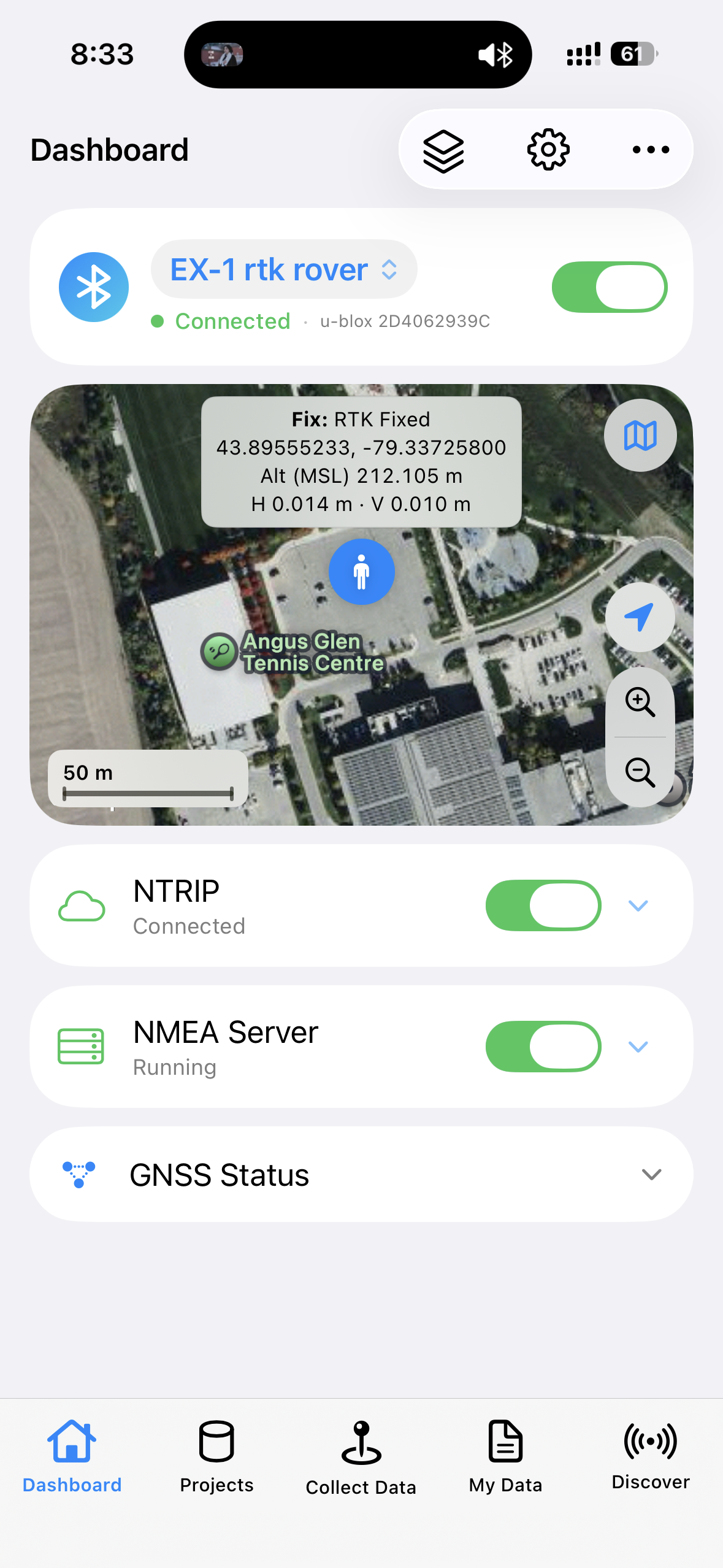
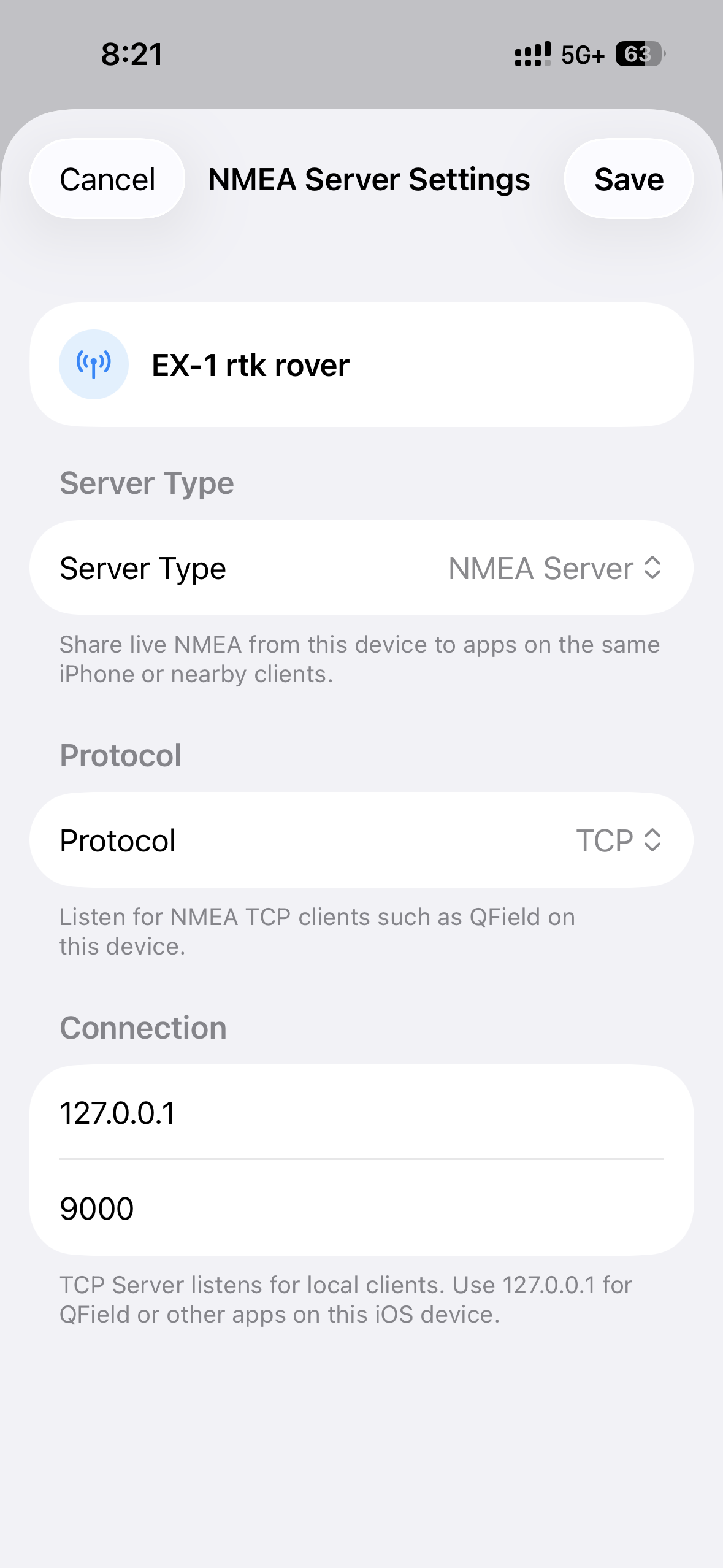
Want the full feature list, compatible-receiver notes and setup details? See the GeoAstra BLE-GNSS iOS App product page.
Product Resources
Official Documents
- P-70 Ultra Online User Manual
- How to connect P-70 Ultra to a Windows PC via Bluetooth?
- How to connect P-70 Ultra to macOS via Bluetooth?
- How to connect P-70 Ultra to an Android device via Bluetooth?
- How to configure ArcGIS Pro Windows desktop software for P-70 Ultra?
- How to configure ArcGIS Field Maps Android app for P-70 Ultra?
- How to configure QGIS Windows/macOS desktop software for P-70 Ultra?
- How to configure QField Android app for P-70 Ultra?
- How to configure Mock Location App for Android
- How to change Baud Rate for P-70 Ultra?
- How to manually set the Reference Point location for P-70 Ultra when configured as an RTK base station?
- How to switch the RTCM message type of P-70 Ultra to MSM7?
- How to enable the RTCM 1006 message of P-70 Ultra?
- How to obtain the current positioning accuracy from the P-70 Ultra’s output messages?
- How to modify the Columbus P-70 Ultra’s NMEA and UBX output messages?
How-to Articles and Blogs
-
 Understanding Non-USB GNSS Receiver Interfaces: RS-232, TTL/UART, and Connectors
-
How to use a RTK GNSS Receiver for Android: A Step-by-Step Guide
-
Utilizing a USB/Bluetooth RTK GNSS Receiver with a Windows 10/11 Laptop: A Step-by-Step Guide
-
How to Connect a USB/Bluetooth RTK GNSS Receiver to Windows? (Accessing NTRIP Through an Android Phone’s Internet Connection)
-
Utilizing a RTK GNSS Receiver for Linux: A Step-by-Step Guide
-
Utilizing a USB/Bluetooth RTK GNSS Receiver for High Accuracy Data Logging: A Step-by-Step Guide
Tech Support Topics and Forums